Table of Contents
FluentCommunity is a new plugin for creating a community portal on your WordPress website. It is from the WP Managed Ninja team. This is a well respected team with good plugins. We will see several of them used in the video. A cool thing about this plugin is that the team has used it internally for a few months and then set up a community with it for beta testers. Everyone saw in action in the real world and the team made changes, additions, and tweaks in response to user feedback.
This article provides a link to the walk-though video as well as resources and information you’ll need when setting up your community.
Video Version
This video provides a complete walk-through for setting it up. It shows what you need before starting, how to setup forms, automate adding community membership, creating discussion areas, and creating courses. A simulated premium course signup is also included to show how easy it is to add premium content.
Required WordPress Settings
On the Settings / General tab in the admin you will need to have site registration enabled, since we are setting up a membership site. FluentCommunity also requires that you have the permalinks set to the pretty permalinks option.
Used in Setting Up the Demo Community
Here are the plugins and themes used in the video:
- The free Kadence Theme – used because it is a good theme with sensible configuration out of the box.
- The free Kadence Blocks plugin – the Row/Layout block has an option to show or hide the section base on if the user is logged in or out. This was used on the membership page to show a login form if the user was not logged in, or a Go to the Community button if the user was already logged in.
- The free FluentAuth plugin – The plugin provides login form brute force protection, 2fa, social login options, shortcodes to embed registration, login, and password reset form on separate pages, as well as login redirects to a URL of your choice. The shortcode forms and login redirects were used in the demo.
- The free FluentCRM plugin – in addition to being able to setup email lists and sending emails, this plugin has some automations. It already has integrations with Fluent Community to add/ remove users to community spaces and courses on login or form submission.
- Fluent Forms Pro – this forms plugin was used to create a fake custom payment form to demo getting access to the premium membership content. The form was linked to a FluentAuth automation so when a person paid for access they were automatically added to the premium community content.
- I didn’t set it up on the video, but you will want a plugin for outgoing email. I use FluentSMTP and here is a tutorial on setting it up.
- The Free and Pro versions of the FluentCommunity plugin. Note that if you install the pro version first then it will automatically install the free version for you.
Planning Ahead
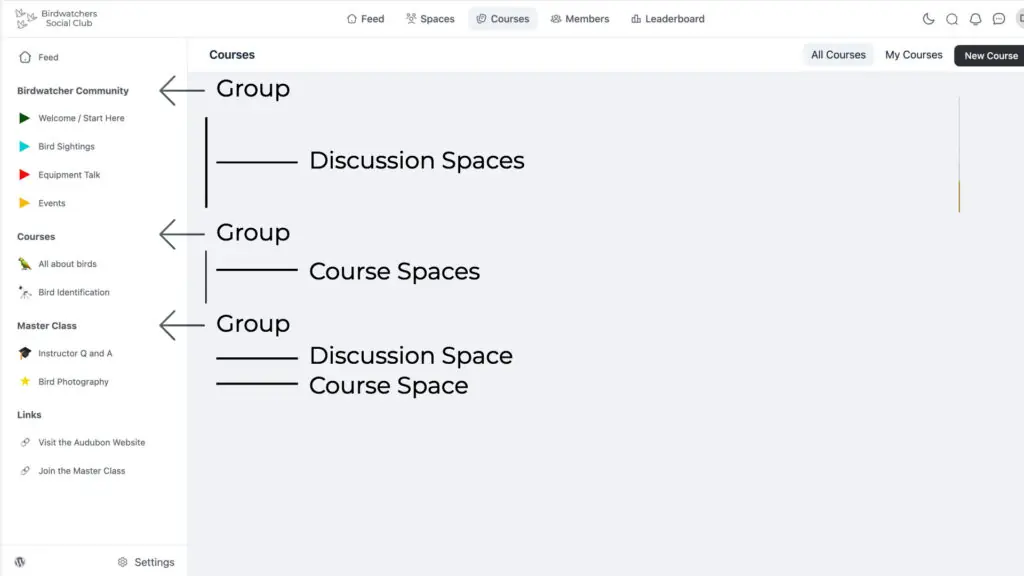
In FluentCommunity there are “groups” and inside of those you have “spaces”. Spaces can be either a discussion area or a course. It is possible to set these to be public, members only, or hidden.
Before actually setting up a community, I want to suggest that you have a plan because if you just go in to the community and start clicking around and making changes you’re gonna miss some things. In the end you’ll learn where things are and how things work, but it’ll feel a little chaotic. Instead I suggest you do two things: 1) think what groups and spaces you want to have and 2) then second create in advance the recommended images that you need for those groups and spaces.
Below is a screenshot of the community built in the video. You see along the left side here there is something called Birdwatcher Community, that’s a group there’s another group called Courses, and then a group called Master Class. In a group you can have spaces and you can add two types of spaces. There’s a discussion space and a course space. I’m suggesting that you think in advance what kind of navigation, what kind of groups and spaces, you want to create, because that’s going to be a majority of the setup.
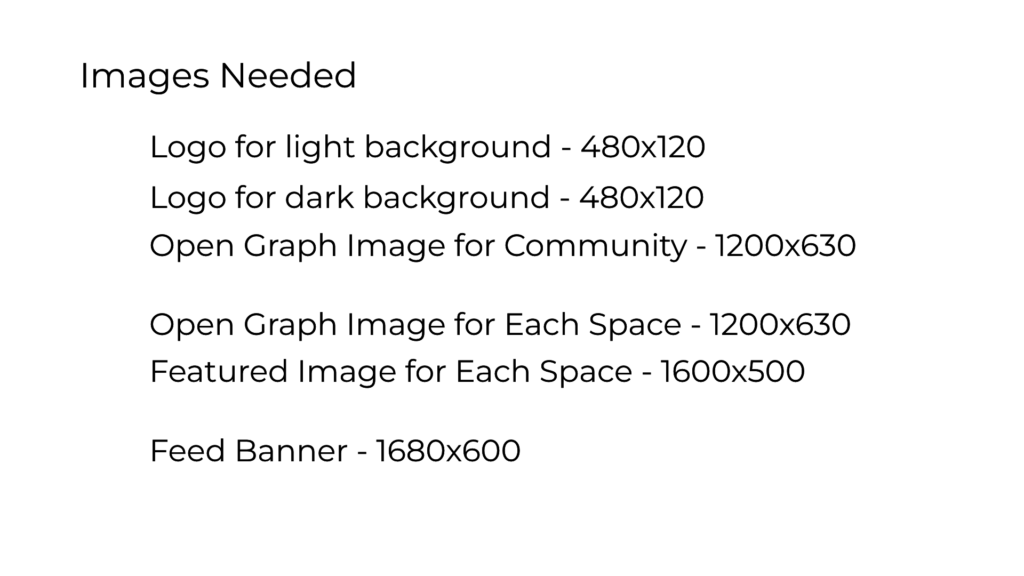
There are several types of images you need:
- A light version of your logo that is 480 by 120, that is an image for use on a white background
- If you want to allow people to switch to dark mode, which I think is nice, then you’ll need a logo to work for the dark mode that’s 480 by 120, and it is placed on a dark gray background.
- An Open Graph image for your community that’s 1200 by 630.
- For each space and course you’re going to need an Open Graph image that 1200 by 630.
- For each space and course a featured image which is 1600 by 500.
- For the feed you will need an image that is 1680×600 for members and one that shows for non-members. You could also use a video for the feed instead.
Discussion and Conclusions
FluentCommunity is full featured, especially given that it’s brand new. So it’s usable out of the box. We have profiles, membership access levels, discussion groups, courses, the option for restricted premium content, as well as gamification and badges.
There has been a long history of plugins that brought community features to WordPress in the past. The most well known is BuddyPress, which is an official WordPress project. However, BuddyPress has not received regular attention and updates, but has progressed in spirts. Also, implementing a community using BuddyPress is somewhat convoluted and people often complain about performance. BuddyBoss is a commercial fork of BuddyPress which is generally recognized to have modernized BuddyPress, it also requires a lot of server resources. In other words, a common theme with WordPress-based community plugins has been that as the community starts to scale up, people see performance issues. It’s not that you can’t do it, it’s just that you need to put a lot of attention on optimization. And the result of that experience has led a lot of people, even WordPress professionals, to host their communities on third-party platforms.
The FluentCommunity team’s solution to this is that they’ve created their community portal using separate database tables. So they’re not using the standard posts and custom post types that we’re all familiar with in WordPress. That has some advantages, obviously performance as I’ve just mentioned, but it also has some limiting factors.
FluentCommunity is architected as a portal inside of your WordPress site. It is not set up like a Custom Post Type and that has its pros and cons. On the plus side it’s easier to control what members see and there isn’t a need for a complex membership plug-in. There may also be performance benefits to having a separate space with separate database tables. Still there seems to be a need for a number of plugins in order to provision a community using WordPress, as we saw in the video. Perhaps that’s the nature of the beast or maybe the team can add some of the common requirements to the FluentCommunity plug-in to lighten the load.
The other side of the coin, because it’s a separate portal, you don’t have access to the normal features of WordPress or plugins. This means that integrations for FluentCommunity have to be created and that is a limiting factor. We saw that their own FluentCRM has integrations in its automation module and I’ve heard that FlowMattic is creating some automation options also. However, for this to really take off I think we’d hope to see more integrations from other third parties.
There’s a trade-off when you create your own community versus using a platform like Circle. With a third-party platform you don’t have to worry about hosting, performance, security, or setting up an e-commerce option, but you pay a lot for that convenience. When you do it yourself you do have to administer the site, set up for payments, and keep the server running smoothly, but you have control over your user list and the information and more importantly you can integrate your community with your other offerings, usually for a much lower cost.
It seems to me that if you don’t have a website or just have a brochure site that using a third-party platform makes a lot of sense. However, if you already have the site with products, services, users, and so on, then FluentCommunity is going to be a way to add a community component in a way that enhances your offering without a lot of disruption. FluentCommunity will be a good option for coaches and course creators as well as for product owners who want to have a user community off of social media. It’s good to see more community options for WordPress. With FluentCommunity the WP Managed Ninja team demonstrates that hosting a community portal on WordPress still makes sense.