
WP Perspectives Issue 20: Understanding Gutenberg?
The Gutenberg project is like an in-flight engine replacement.
Chris Lema
What Is Gutenberg?
I’ve come to the conclusion that I’ve misunderstood Gutenberg. Sure, the project has been evolving over the past 5-6 years, so maybe it isn’t just me. I thought phase 1 was a content editor, phase 2 was a theme builder, phase 3 was Google doc style collaboration, and phase 4 enabling multilingual in core. Now I realize that Gutenberg isn’t what I thought it was.
I thought of Gutenberg as a “Content Editor” and a “Theme Builder.” The first phase of Gutenberg replaced the TinyMCE editor, now called the Classic Editor, with the block editor. There was a lot of unhappiness about Gutenberg the content editor in its early days, but now there is a wide consensus that it is good. With the old Classic Editor there were no columns or buttons and it was difficult to do things like add an image in beside the text. Gutenberg the content editor fixed those shortcomings and many more.
Then the second stage of Gutenberg got underway and we were introduced to the “Site Editor,” originally called Full Site Editing. While the content editor allowed you to create, well, content, the Site Editor allows you to create headers, footers, and post type templates, all using the same block editor. The professional version of most page builders allows you to create templates like this and so I and others referred to as a “theme builder,” and that is what I thought phase 2 was about.
In order to be able to create and edit headers, footers, etc with Gutenberg those templates needed to be created with blocks, and thus we saw the introduction of block-based themes. Gutenberg based themes have not caught on yet the same way that the Gutenberg content editor has. I’m starting to think that they may not really “catch fire” until phase 3 comes to fruition.
Wait, what was phase 2 about if not “theme building”? Various people, such as Frank Klein in his newsletter, say that phase 2 is better thought of as having to do with “customization.” On some level that makes sense if features off of the old “Appearance” admin menu, like Menus, Site Logo, and the WYSIWYG Customizer optimizations were / are being moved under and replaced with the “Site Editor.” These features, if you are determined and patient, are workable, but still clunky. Despite that, there have been some cool things started as part of phase 2, such as the introduction of fluid typography and spacing and CSS variables in theme.json, the Style Book, and color and typography style sets. However, I don’t think any of these are really in a finished state yet, but rather can be seen as ongoing projects.
We are going into phase 3 of Gutenberg, which has been labeled “collaboration,” but now it has been shared by Matias Ventura that phase 3 is much more than that. There has been a post on the Make WordPress blog about each component of phase 3:
It is interesting now that we are in phase 3 to learn that this phase is about much more than collaboration. Has that always been the case, or has phase 3 become the catch-all phase?
Matt Mullenweg has commented at various times that the entire WordPress admin would one day be rewritten using blocks. This is what is being started as part of phase 3, the reimagining of the WordPress admin. When Matt Mullenweg comments that he hopes Gutenberg will be the foundation that WordPress developers can build on, perhaps this is what he is referring to?
If you want to see what is coming, Version 17.4 of the Gutenberg plugin has some interesting changes. The “Site Editor” menu item under Appearance shows only as “Editor.” There is also an experimental feature called “Test the new views for different entities like pages.” When that is enabled then the Pages page (sorry about that) under Appearance / Editor / Pages has a link at the bottom that says “Manage all pages.”
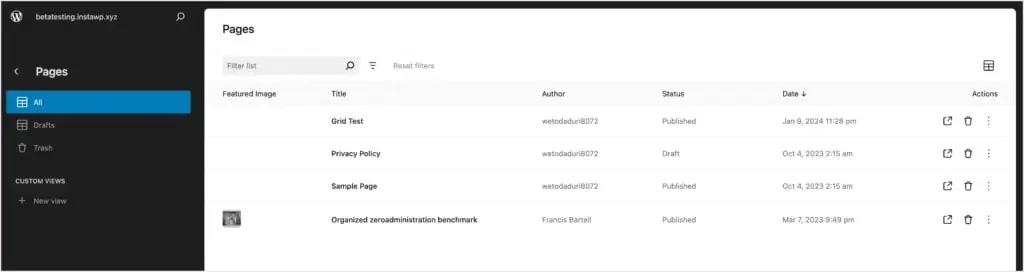
From there you can view all pages, filter them, pick which columns to show, change the sort order, edit a page, view a page’s revisions, and create a custom list view. The only thing I didn’t see was how to create a page hierarchy! Note that in this iteration “Pages” are still also available as they classically have been as a high level admin menu item. In the future I’d imagine that would change. There is some potential that the admin redesign could be disruptive. Plugin authors should keep an eye open for the best way to take advantage of the admin changes.
So, where are we now? Well, it is pretty clear that “Gutenberg” is the overall project. The project includes a number of components: the content editor, the Site Editor and site customization, as well as collaboration, workflows, revisions, changes to the media library, a block library for block management, and an admin redesign. With phase 4 we will move on to core support for multilingual. It is also pretty clear that phase 3 isn’t going to be completed in a year.
At this point calling one of the components “Gutenberg” really confuses things as it may not be clear what you are referring to. Consequently, I’m going to be more specific and use content editor, site editor, admin redesign, etc going forward and reserve “Gutenberg” to refer to the overall project.
Does this clarify anything? I hope so. What do you think?
Recently Published
FluentSnippets: A File Based Code Snippets Plugin – Another free plugin from the WPManageNinja team. There are a number of snippets plugins, but this one has some unique features.
Customizing the WordPress Admin Using Admin and Site Enhancements Pro – This is my second look at ASE where I demo some of the features.
Three WordPress Predictions for 2024 – I shared some things I saw in the crystal ball 🙂
From Around the Web
These font stacks will improve your site performance – Kevin Powell gets a little feisty talking about fonts and even WordPress gets some love. What do you think, use the system font stack for the win, or is the designer in you cringing?
Mastering Bricksforge Pro Forms with Expert Techniques – Here is a great tutorial by Paul Charlton showing how to use the Bricksforge Pro Forms feature to create front-end post submission forms. Incredible leverage of Bricks dynamic data features with a powerful Bricks addon.
Feature Section Victor From Scratch in Bricks – Kevin Geary shows off the power of the Bricks Builder using no addons. A nice tutorial.
Identifying and Registering Anonymous Functions in WordPress – For developers and power users – this article by Tom McFarlin discusses how anonymous functions work in WordPress.
Gutenberg the Inside Story – A great interview of Matias Ventura the Gutenberg Lead Architect by Jamie Marsland.
Deals
Automatic.css is an advanced CSS framework for Bricks, Oxygen, Cwicly, and Gutenberg. There is currently a lifetime package available.
I want to remind you that two of the top builders have price increases coming:
What’s Up Next
I am eagerly awaiting Cwicly’ upcoming Tailwind integration which I want to try out as soon as it is ready. I’m also looking forward to Brick’s release of components. These two are the most advanced solutions currently available.
Thank you for reading. I’d like to hear what you have to say about the newsletter content and what you are excited about. Feel free to comment or send me an email through the contact form.
David McCan
January 11, 2024