
Table of Contents
If you’ve used more than one WordPress security plugin, you already know the frustration: no single plugin ever seems to have everything you need. You end up stacking a security plugin with a logging plugin, maybe a firewall service, and a password policy tool bolted on separately. Atlant Security is worth a look because it pushes back against that pattern — and it does it as a completely free plugin, with no premium upsell.
Video Version
Where Atlant Security Comes From
Most WordPress security plugins grew up inside the WordPress ecosystem, or were ported over from general PHP/CMS security tools. Atlant Security is different: it comes out of Atlant Security, a company whose core business is security audits, including IT security audits, virtual CISO services, SOC 2, AWS security assessments, penetration testing, and similar enterprise-grade services. Their “Intelligence” section offers several free security tools, mostly aimed at Windows, NTFS, and Microsoft 365 environments, with the WordPress plugin as their entry into the WordPress space.
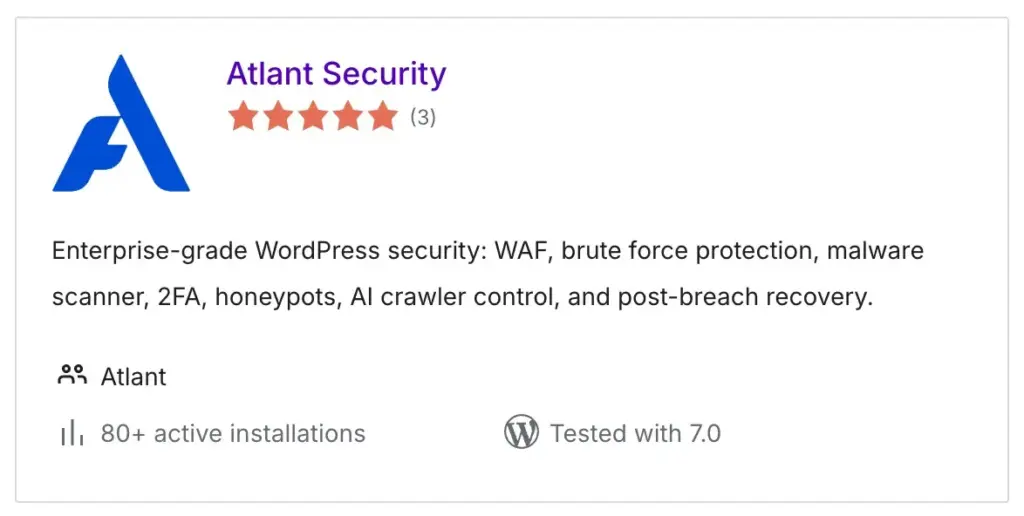
In the WordPress.org plugin directory we see that Atlant Security isn’t brand new, but it’s updated regularly. However, it currently has only 80+ active installs. That’s a surprisingly small number given the feature set, and it may simply reflect how hard it is for new plugins to get discovered in a crowded directory. The reviews that do exist are positive. There are three five-star ratings, and support response has been solid, with four out of five support questions answered in the last 60 days.
Walking Through the Settings
I installed Atlant Security on a test site to go through its options directly. It adds its own admin menu with a long list of settings grouped by category, and a setup wizard at the bottom that lets you apply recommended defaults or step through configuration manually. My recommendation is to run the wizard for a good baseline, then go through each settings page yourself to confirm everything matches how you want your site locked down.
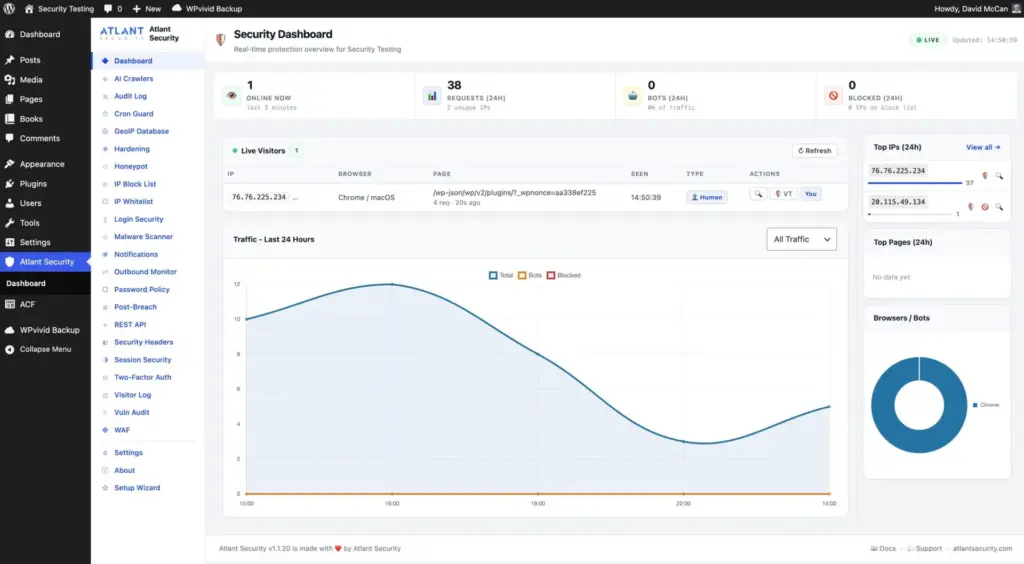
Here are the feature categories:
Dashboard: An overview of site activity.
AI Crawlers: An option to limit known AI crawlers (though there’s currently no way to add crawlers beyond the built-in list).
Audit Log: An audit log of changes made on the site.
Cron Guard: A very unusual feature for a security plugin. It shows a list of your site’s cron jobs with a status assessment for each. Unknown or suspicious cron jobs are flagged, and you can block them directly. Since cron is often a total black box on WordPress sites, and a common place for malware to hide, having visibility here is a real plus.
GeoIP: Download and enable a MaxMind GeoIP database for location-based rules.
Hardening: Standard hardening options as found in many plugins or often done using code snippets.
Honeypot Features: A hidden, nonsense link in your footer that flags and blocks bots that click it, a fake login option, and a honeypot field for comment forms.
IP Block List / Whitelist: Block known bad IPs and whitelist your own.
Login Security: The ability to setup custom login URLs. This doesn’t make a site inherently more secure, but it does cut down on bot traffic, since many bots are hardcoded to hit the default login URL. Google reCAPTCHA and Cloudflare Turnstile support is available along with standard brute-force login form protection.
Malware Scanner: Checks the integrity of WordPress core files, scans the database, and reviews plugins and themes (both from the WordPress.org repository and the uploads folder). It won’t catch everything, but a built-in malware scanner isn’t something every security plugin offers.
Notifications: Email alerts, a daily digest, Slack alerts, or custom webhooks for integrating with other services.
Outbound Monitor: Another standout feature. It maintains a whitelist of common outbound domains and lets you log or block unauthorized outbound connections, with a full request log. This is a useful check on plugins and themes “phoning home” without your knowledge.
Password Policy: Enforce strong passwords. This sounds basic, but plenty of established security plugins (Patchstack, for example) skip it. It’s especially valuable on membership sites.
Breach Remediation Helpers: A checklist for what to do if your site is compromised: critical steps like locking down the site, taking it offline, terminating active sessions, and forcing password resets, plus medium-priority and standard steps like reinstalling core files and repository plugins, revoking application passwords, and running an emergency database scan. This won’t fully clean up a serious malware infection on its own, but it’s a useful first-response checklist that most plugins don’t offer.
REST API Controls: Granular options for locking down the REST API.
Security Headers: Fine-grained control over security headers, a feature shared with several other plugins but well implemented here.
Session Security: Block JavaScript access to session cookies (helps mitigate XSS), require secure SSL cookies, control the SameSite cookie attribute, tie sessions to browser fingerprint/IP/user agent to reduce session hijacking, and limit concurrent sessions per user. This is another standout feature.
Two-Factor Authentication: Built-in 2FA setup for use with authenticator apps or by email.
Visitor Log: A log of site visitors.
Vulnerability Audit : Scans for known vulnerabilities.
Web Application Firewall: Log-only, block, or slow-response modes, configurable response codes and blocking duration, a whitelist for logged-in users, and pre-built rule sets (for example, WordPress-specific rules that flag requests for the readme file or debug log, which are both classic signs of hacker scanning. The one gap here: there’s currently no way to add custom firewall rules, such as the popular 6G/7G/8G rule sets.
Settings Summary & Misc: Trusted cloud provider settings (useful if you’re behind Cloudflare), reverse proxy configuration, and an option to delete all plugin data on uninstall, a small but appreciated touch that more plugins should include.
I also noted that the plugin’s own info page doesn’t try to upsell you on anything. It’s just documentation.
Discussion and Conclusions
A few things stand out about Atlant Security.
First, its lineage. Coming from a general security audit firm rather than the WordPress ecosystem gives it a slightly different perspective, and it shows in features like the outbound monitor and breach remediation checklist. These are things you’re more likely to see in an enterprise security context than in a typical WordPress plugin.
Second, the breadth of features. It has the common features like GeoIP, hardening, honeypots, CAPTCHA, IP blocking/whitelisting, security headers, two-factor authentication. Atlant Security adds several things that are uncommon: an audit and session log (eliminating the need for a separate logging plugin), c cron guard, a password policy option, malware scanning, breach remediation guidance, and the outbound connection monitor.
There are a couple of caveats worth keeping in mind. The plugin’s low install count means there isn’t much of a community track record yet, so it hasn’t been battle-tested at scale. And there’s room for improvement in a couple of spots: the AI crawler list and firewall rule sets are both fixed rather than user-extensible, so you can’t add custom entries to either.
Overall, though, this is an impressive plugin. The settings are well organized and easy to navigate, and it covers essentially everything you’d expect from a good security plugin, along with several things you normally wouldn’t get without installing two or three separate tools. I’m planning to run it on one of my own sites to see how it performs over time, with an eye toward rolling it out more broadly if it holds up.
If you manage WordPress sites and have felt the pain of stitching together multiple security plugins to get full coverage, Atlant Security is worth testing for yourself, especially since it is free.